4 entries · Active

Updated

Hank for OpenClaw

Building a personal OpenClaw client for Mac, iPhone, and iPad.

I’m building a client for OpenClaw on Mac, iPhone, and iPad. The project is called Hank.

The question behind it is how much better a personal agent can feel when the interface is built for the devices I use every day. This stream records the work: what I try, what works in daily use, and what still needs figuring out.

Entries

RSS

· 004

Finding

Who's talking?

In OpenClaw’s own interface, some of my messages showed up as someone else’s. The ones I’d sent from Hank carried one name and avatar; the ones typed in the OpenClaw app carried another, on the other side of the conversation. I assumed Hank was missing a step: some way to tell the Gateway that the person on the iPhone is the same one at the desk.

There is no such step. An OpenClaw Gateway decides who a connection is from how it arrives, and it ignores what the app says about itself. Hank’s name and client ID are never treated as identity. A route that proves who you are gives you your own profile. The Gateway’s token, a password, or a device key gives a shared owner profile, the same one for every app that signs in that way. The rules are spread across OpenClaw’s multi-user, user model, and operator scopes pages; I checked them against the 2026.10.7 source.

How the app reaches the Gateway Who the Gateway says it is
Through Tailscale Serve, with Tailscale identity on You, from your Tailscale login
Through a sign-in proxy such as Cloudflare Access You, from the proxy’s email
With the token, a password, or a device key The shared owner, the same for every such app
With a device key alone, on a Gateway with roles Refused

On my Gateway, the Mac mini called nemo, I’m two people. Hank on the iPhone and the Mac, and the dashboard in my browser, all come through Tailscale and arrive as my own profile. The OpenClaw app on nemo connects over loopback with the token and arrives as the shared owner, named after the Mac’s user account. OpenClaw never merges the shared owner with a person, so the two stay apart, and each sees the other as a stranger.
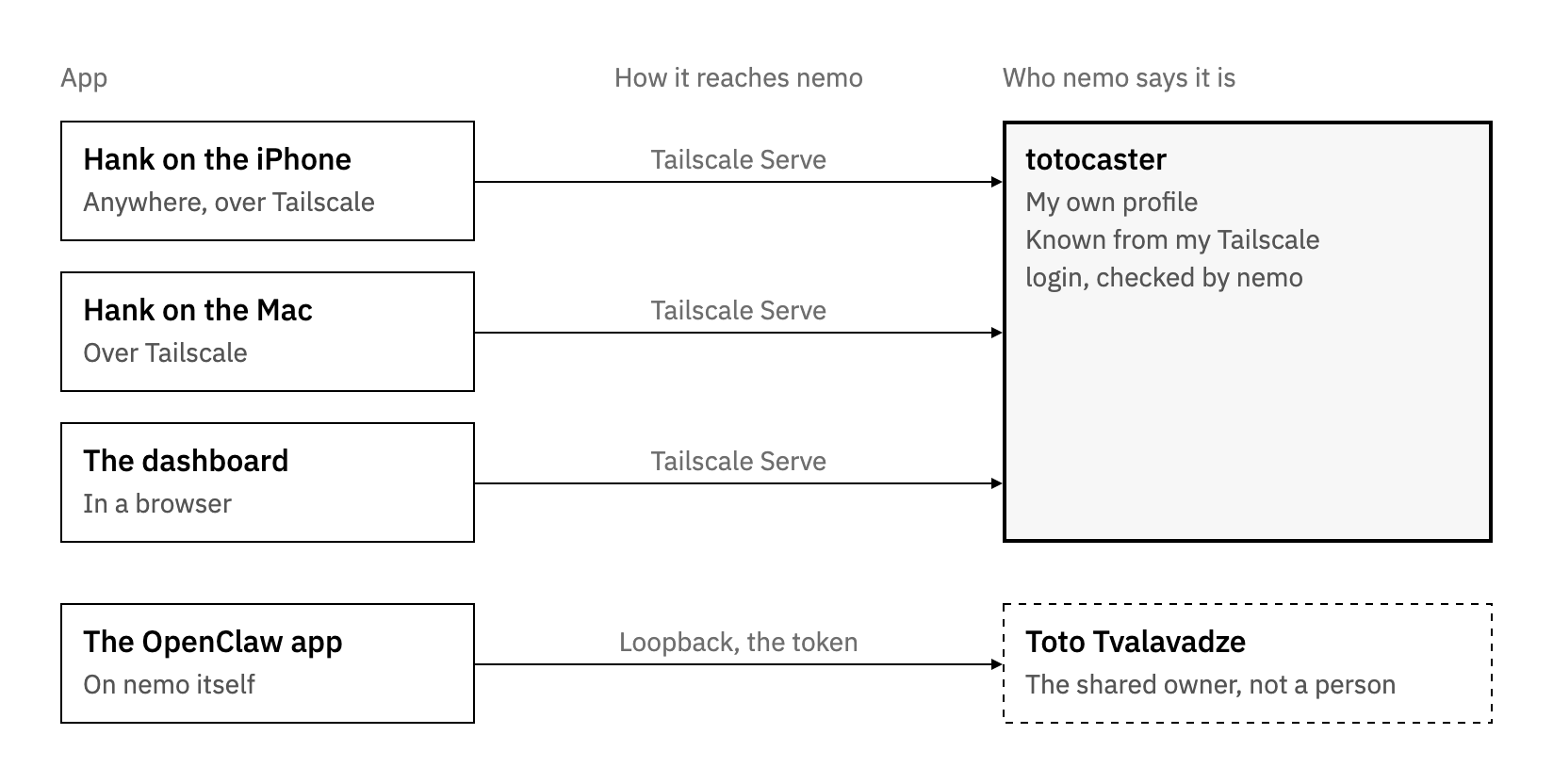
Four apps on the left and how each reaches nemo. Hank on the iPhone, Hank on the Mac, and the dashboard come through Tailscale Serve and arrive as one profile, totocaster. The OpenClaw app on nemo connects over loopback with the token and arrives as Toto Tvalavadze, the shared owner, drawn dashed because it isn't a person.
Four apps, two people. The Gateway names each app by the route it took.

The other half of the problem was in Hank. Every message the Gateway sends carries its sender: the profile, a name, a picture, and the app it came from. Hank ignored all of it and drew every message that wasn’t the agent’s as mine. That’s harmless while I’m alone in a conversation, and wrong as soon as anyone else writes in it. A message from Ludo, or one relayed from Slack, would arrive in my coral bubble.
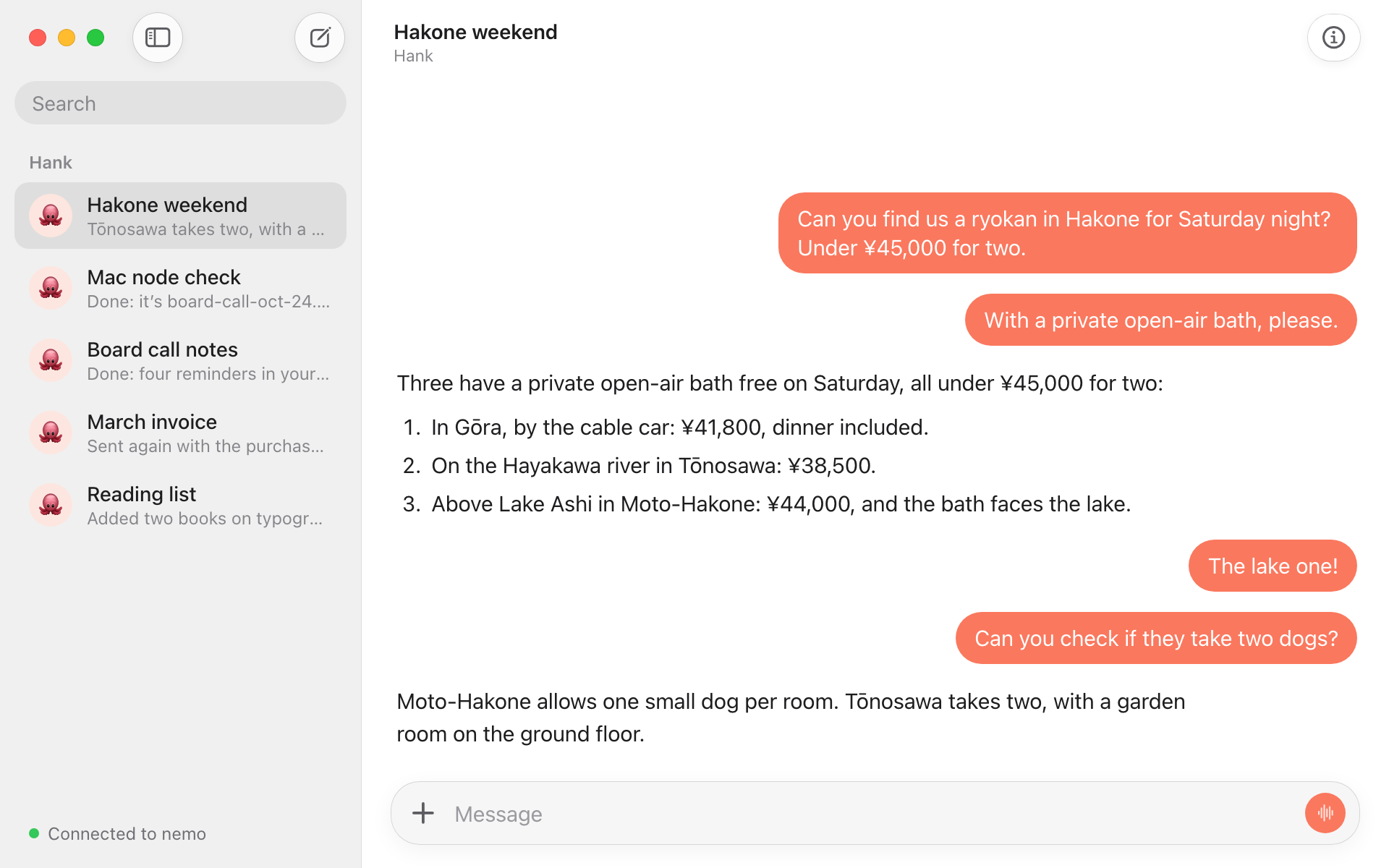
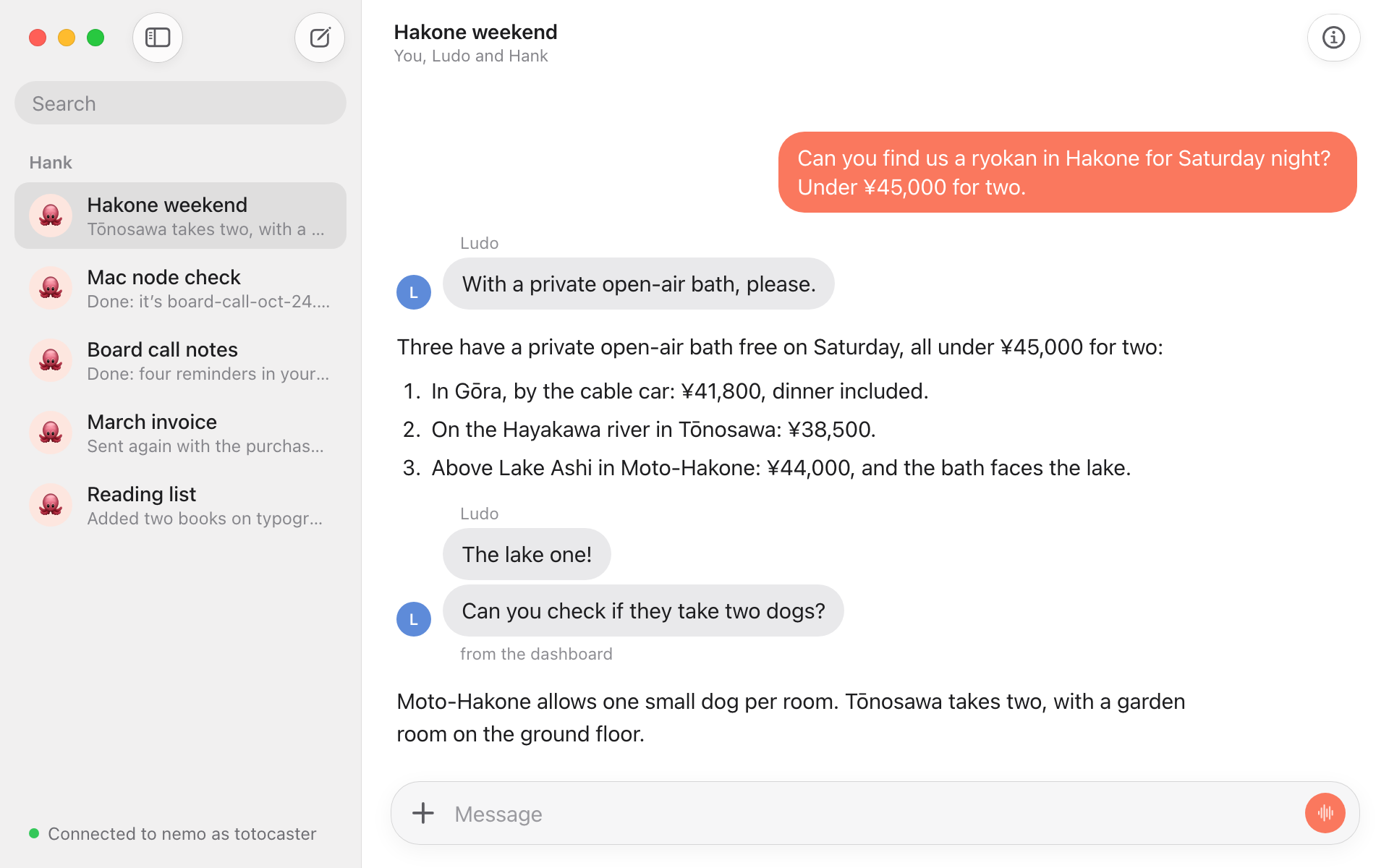
Hank today: The same Hank conversation about a ryokan in Hakone, drawn two ways With senders: The same Hank conversation about a ryokan in Hakone, drawn two ways
A conversation Ludo has joined. Today every message that isn’t Hank’s is drawn as mine. With senders, hers are gray on the left with her name and initial, and the one she typed in the dashboard says so.

The fix on Hank’s side starts with knowing who it is. After every connection it will ask the Gateway (users.self) and keep the answer: my own profile, the shared owner, or nobody. Settings shows it under the Gateway’s name, and a Signed In As section names how the Gateway knows, or says plainly that the shared owner isn’t a personal sign-in. Nothing there is a setting. Hank reads it each time it connects.
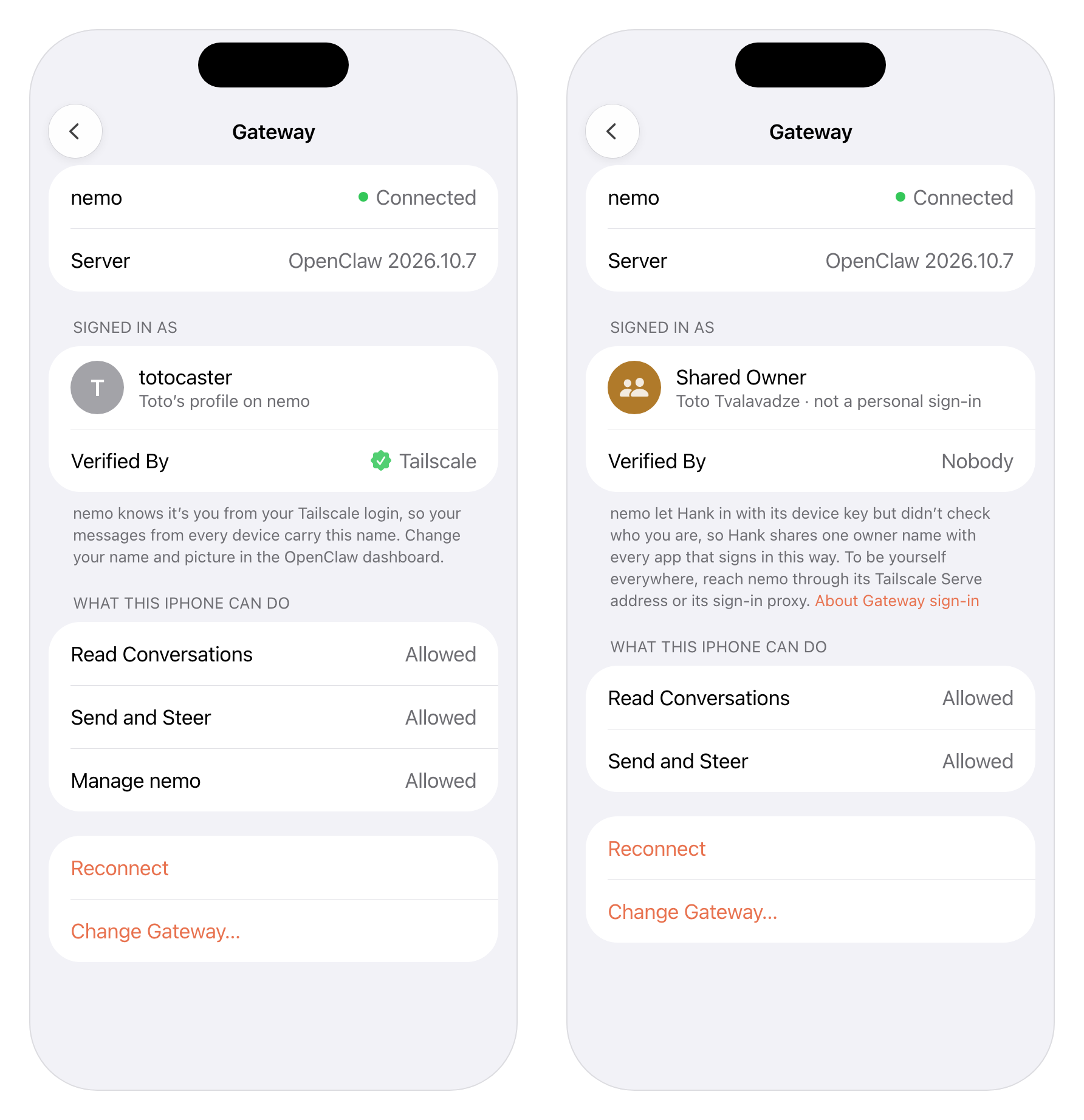
Two iPhone screens of Hank's Gateway page. On the left, Signed In As shows totocaster, verified by Tailscale. On the right, it shows Shared Owner, Toto Tvalavadze, not a personal sign-in, verified by nobody, with a note on how to sign in as yourself.

The Gateway page signed in as my own profile, and as the shared owner.

In the conversation, a message is mine when its profile is mine. Anyone else gets their name and picture in a gray bubble on the left, as in a group in Messages, and a small caption says when a message came from another app. On a Gateway with one person, the shared owner’s messages are mine as well, with a small “Shared owner” caption: OpenClaw’s docs say it doesn’t count as a person. As soon as a second person has a profile, it becomes someone else again. When anyone besides me has written in a conversation, its details list the people who took part.

Two things Hank can’t fix. The agent learns who I am but not which app I used, so it can’t tell a message from my phone from one typed at the desk. And the OpenClaw app on nemo will stay the shared owner unless it, too, reaches nemo through Tailscale.

One result I didn’t expect: a second person on one Gateway is closer than I’d assumed. Through Tailscale, Ludo’s devices would arrive as her. OpenClaw still treats a Gateway as one trust domain, so that keeps our messages apart, not our data.
· 003

Finding

Displaying long replies

Hank shows the agent’s reply while it’s being written. I’m trying to make long answers readable as they arrive, without jitter or scrolling that makes me lose my place.

The first build, on 2026-10-10, used bubbles on both sides, as in Messages. The narrow column cramped Hank’s headings, lists, tables, and code.

On 2026-10-13, I removed the bubble around his replies and gave them the full width; mine stayed in bubbles. Looser line spacing, modest headings, and a short hairline between consecutive replies kept his messages distinct.

Streaming brought another problem. Text arrived in bursts, unfinished Markdown flashed its asterisks and pipes, and the conversation jumped to the end several lines at a time.

On 2026-10-22, I changed how replies stream: whole words fade in over 0.28 s, paced 0.45 s behind their arrival. The renderer closes unfinished Markdown, as Vercel’s remend does, and holds tables until they’re complete. A continuous glide replaces the jumps, and my question moves to the top with the reply below it.

That reduced the jitter, but every message I sent still pushed the conversation to the top of the screen.

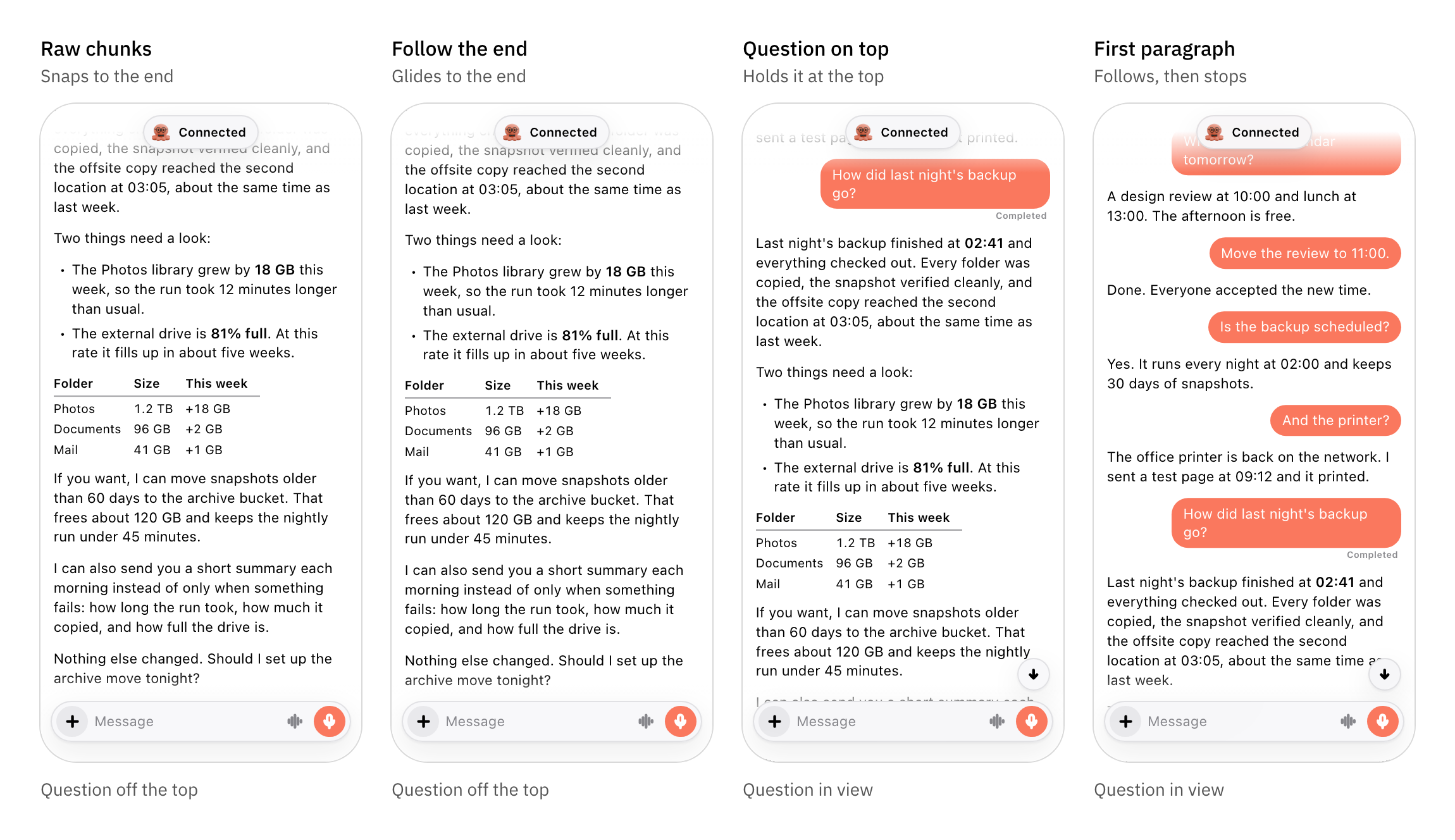
Then I modified the view to leave my bubble just above the composer. It followed Hank’s first paragraph, then stopped, keeping my question on screen. Automatic following resumed only when I scrolled to the bottom or used the jump button. Pacing adapted to the rate at which text arrived, and the same change smoothed streaming on the Mac.

Four Hank screens at the end of the same reply about last night's backup. Raw chunks and Follow the end have scrolled the question off the top. Question on top holds it under the header, with the rest of the reply below the fold. First paragraph stopped once the first paragraph was written, with the question still in view and the jump button for the rest.
One simulated reply, arriving in uneven bursts. Raw chunks shows each chunk as it lands and snaps to the end; the other three fade whole words in at Hank’s pace and differ only in where the view goes. Play it on the page.

The working rule is to let me start reading, then leave the pace to me. Reports from Open WebUI and OpenAI’s desktop apps describe the same problem: automatic scrolling carries the beginning of a long answer out of view.

The broader guidance supports keeping movement small. Google’s layout-shift guidance describes how unexpected shifts lose a reader’s place; Bartram, Ware, and Calvert’s motion study shows how movement draws attention, especially at the edge of vision; and Apple advises restraint with motion in frequent interactions. My aim is a short fade on new words, with the lines I’m already reading staying put.

· 002

Progress

Meet Hank

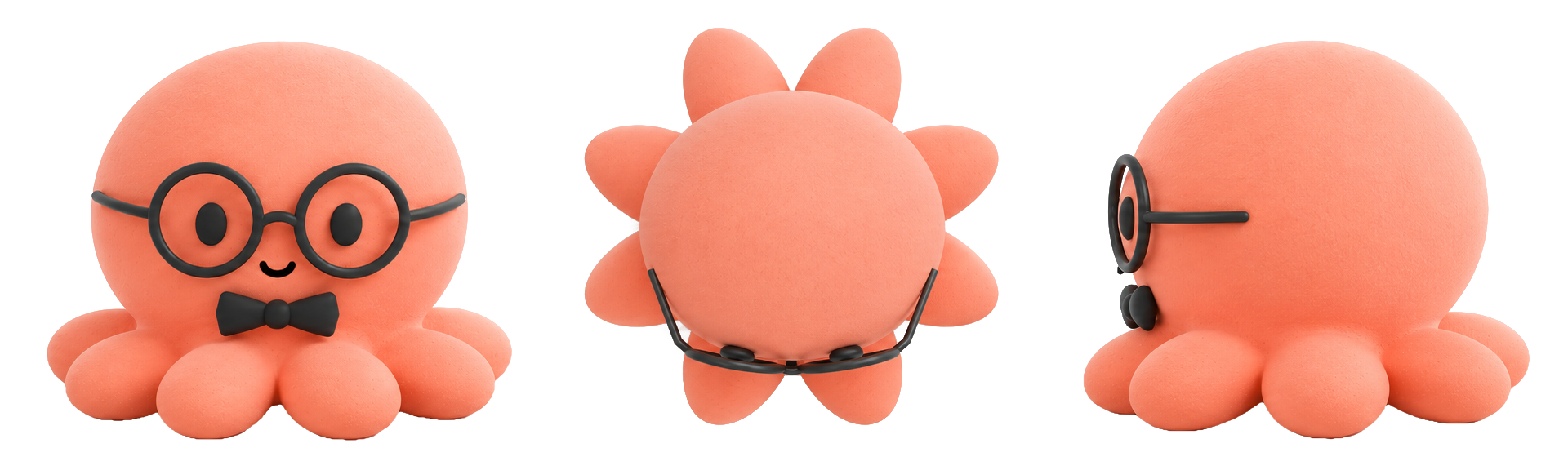
Hank is the character for the OpenClaw client I’m building. He’s a small coral octopus with eight short arms, glasses, and a bow tie.

Three full-color renders of Hank, a coral octopus with black glasses and a bow tie, seen from the front, above, and the side

Hank from the front, above, and the side.

The face studies keep the glasses and bow tie fixed, and change the eyes and mouth. A small smile, closed eyes, or an open mouth gives him a different expression without changing the rest of the shape.

Four full-color portraits of Hank with the same glasses and bow tie: a small smile, closed happy eyes, a small round mouth, and a taller open mouth

From left: calm, happy, curious, and speaking.

· 001

Progress

Why I'm building Hank

I’ve been running Peter Steinberger’s OpenClaw since 2026-01-12, back when it was called Clawdbot. With Muse, Grok Bot, and OpenAI’s dot, personal agents are moving forward, and I quite like the direction.

A useful personal agent needs access to very personal information and the tools I use to do things with it. I wouldn’t feel comfortable handing that much of my life to Apple, let alone Meta. I want to run the agent on my own hardware and be able to change how it works.

I expect most people will be happy with the ready-made assistants. For people who want their own deployment, OpenClaw is the best option I’ve found so far.

The part I’ve struggled with is the interface. I’ve tried the web app and the integrations with WhatsApp and Telegram. Some are impressively good, but I keep wanting to do things the interface makes awkward.

So I’ve started building Hank, a client for macOS, iOS, and iPadOS, with OpenClaw underneath. I want to make the best client I can for the devices I use myself.

Whether it becomes a commercial product, we shall see. For now, I’m enjoying building it and using it.