
Obsidian · Project
Better Kanban Bases View
Focused Kanban view for Obsidian Bases with keyboard-friendly card movement, date states, and workload cues.
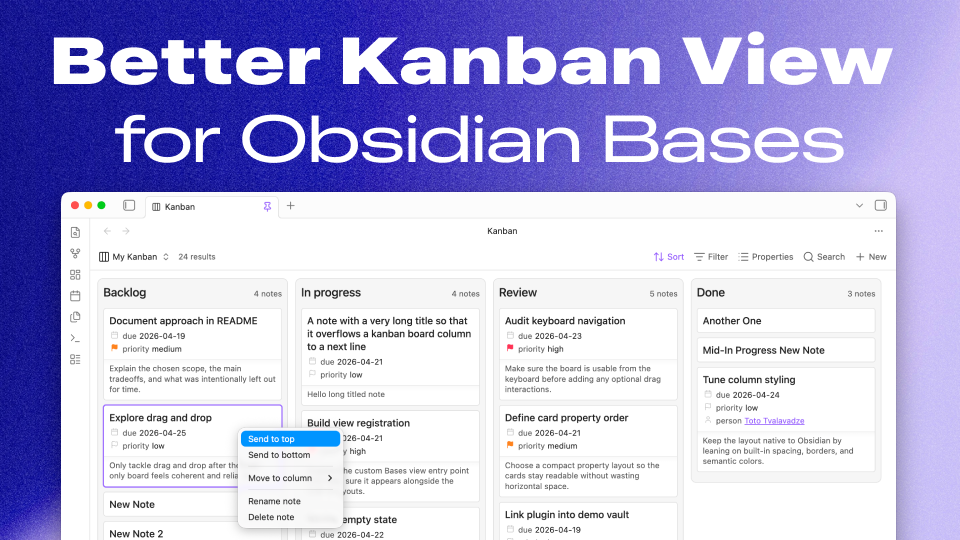
Better Kanban Bases View is an Obsidian plugin that adds a focused Kanban layout to Bases. It keeps the existing Bases controls for sorting, grouping, filtering, and property selection, then renders the same results as columns and cards.
This is a Bases view: it extends the presentation capabilities of Obsidian Bases without creating a separate Kanban file format or a second set of project-management settings.
The “Better” in the name is mostly practical, not a claim that every other Kanban plugin is worse. I needed a name that was still available, and Kanban-related plugins are popular enough in the Obsidian community directory that the obvious names were already crowded.
I also really like how Things 3 for Mac handles shortcuts, so I tried to emulate that behavior inside the view. The goal is for keyboard navigation and card movement to feel fluid and pleasant, not like an afterthought bolted onto a mouse-first board.
What it does
- Adds a custom Kanban view to Obsidian Bases.
- Builds columns from the active Bases grouping.
- Shows each note’s title plus the properties already selected in Bases.
- Renders formula properties through the same evaluated Bases values as the table view.
- Adds optional small or large plain-text previews from the note body, plus native page previews when hovering over a card.
- Displays dates as exact or relative values, with overdue, today, and tomorrow states for workflow-oriented properties.
- Adds soft per-column work-in-progress limits with visible over-limit warnings.
- Gives columns optional semantic accent colors, saved per column and grouping.
- Reorders columns and cards with drag-and-drop, keyboard shortcuts, and context menus.
- Moves cards across columns when the board is grouped by a writable
note.*property. - Saves column order and manual card order per grouping.
- Creates notes in writable columns and supports rename or delete actions from the card menu.
- Makes no network requests and includes no telemetry.
How it fits
Sorting, grouping, filters, and selected properties still live in the built-in Bases UI. The Kanban view adds another way to look at the same notes, then writes changes back to note frontmatter only when a move can be represented by the grouped property.
Plain-text preview size is configured per view. Native hover previews use Obsidian’s Page preview core plugin; hover previews and exact or relative date display are plugin-wide preferences, while WIP limits and accent colors are saved for each Base view grouping. WIP limits are deliberately advisory: they make overloaded columns visible without blocking card moves.
Manual card ordering behaves like a deliberate snapshot of the current grouped board. When the Base sort changes again, the board returns to following that sort, which keeps the plugin from fighting the underlying query.
Install
- Community plugin page: Better Kanban Bases View
- Source, releases, and development notes: totocaster/kanban-base-view-obsidian