Updated

Figures

How this site draws its diagrams, charts, and interactive figures, each one shown with the site's own numbers.

Each figure here is built from the same parts a note or a research entry uses, drawn with the site’s own numbers as of 2026-10-20, and grouped by the job it does. Switch your system to dark mode and every figure follows; on a phone, the line chart, the small multiples, and the instrument change to drawings of their own.

The Palette

Nine swatches with their names and literal values: ink #000000, tone 2 #4F4F4F, tone 3 #7A7A7A, tone 4 #A3A3A3, edge #D9D9D9, surface #F7F7F7, ground #FFFFFF, highlight #FFEB3B, and signal #FF4F00, drawn as a single dot Ink #000000 Tone 2 #4F4F4F Tone 3 #7A7A7A Tone 4 #A3A3A3 Edge #D9D9D9 Surface #F7F7F7 Ground #FFFFFF Highlight #FFEB3B Signal #FF4F00
Every figure is drawn in these nine values. On the page each one becomes a color of the theme, so the drawing turns with dark mode, while the file on its own stays correct in light. Words take #000000, #555555, or #6E6E6E.

Lines

Five line specimens: a rectangle in 1 px ink as an outline, one in 2 px ink as the subject, a 1 px edge grid as context behind a small outlined box, a dashed faint rectangle for what is not yet real, and a faint elbow leader from the word Drawer to a box Outline 1 px ink Subject 2 px ink Context 1 px edge Not yet real 1 px faint, dashed Drawer Leader 1 px faint
Two weights of ink, one context line, one dash, one leader. Strokes keep their width at any scale.

Diagrams

A system

Diagram: four devices in the studio feed Home Assistant Green, the device layer, which sends states to the studio brain and takes calls back. The brain serves five surfaces: the wall screen, phones, the management site, the Stream Deck, and the iPads. Claude reads drawer photos for the brain. Outside it, the cameras reach Apple Home over HomeKit, which shows camera views on the iPads In the studio Device layer Studio brain Surfaces Hue Bridge Pro 16 lamps, 2 controls Local API Aqara Hub M200 3 contacts, climate sensor Matter Broadlink RM4 ×2 2 ACs, planned IR, local Printers Saturn now, Bambu later Integration Home Assistant Green Entities and history Automations that work without the brain Tag scans from labels Studio brain Mac mini now, NAS later Model and its 73 places Catalog and photos Scenes and checks State mirror, event log Serves every screen States Calls Wall screen Always on, read-only Live Phones Web app: find, capture Manage Catalog, entity map Stream Deck + XL Keys and dials at the desk Lab and Study iPads Control panels Claude Reads drawer photos Answers where-is questions Photos down, changes up Cameras, doorbell Camera E1 ×2, G4 Apple Home HomePod hub, iPad views HomeKit, outside the brain Camera views
One brain, five surfaces, from the Ambient Computing stream, at the page’s full width so every word is 14 px or more. The brain is the subject, so it alone takes the 2 px line and the surface fill; what runs outside it is dashed.

A pipeline

Five numbered steps from left to right: write in Markdown, SCSS, and JavaScript; build with Hugo Extended 0.164.0; output pages, feeds, and a sitemap; deploy on DigitalOcean from main; read at ttvl.co. From the output, each dispatch also leaves as email.html, which Campaign Monitor, outside the site, sends to subscribers 01 Write Markdown, SCSS, JavaScript 02 Build Hugo Extended 0.164.0 03 Output Pages, feeds, sitemap 04 Deploy DigitalOcean, from main 05 Read ttvl.co Email email.html Each dispatch Campaign Monitor Sends it to subscribers
How a page gets from a text file to ttvl.co, and how a dispatch also leaves as email. Steps carry their numbers like the sections of a note.

A tree

Tree of the site's sections from ttvl.co: Projects with Darkroom 12, Project Humane 8, Obsidian 6, Notebook system 3, and Bookbinding 1; Notes 17; Research 28 with Ambient Computing 27 and Tools for Thought 1; Log 93; Newsletter 17; Traces 3; and About ttvl.co Projects Darkroom 12 Project Humane 8 Obsidian 6 Notebook system 3 Bookbinding 1 Notes 17 Research 28 Ambient Computing 27 Tools for Thought 1 Log 93 Newsletter 17 Traces 3 About
The site’s sections and the pages in each.

Spans in time

Horizontal spans from 2018 to 2026, one per section, from its first page to its latest: Notes from 2018-11, the Log from 2019-01, the Flâneur from 2021-02, all still running; Darkroom 2024-12 to 2025-08; Project Humane 2024-12 to 2026-09; the notebook system and Bookbinding as single moments; Obsidian 2025-09 to 2026-06; Traces 2026-07 to 2026-09; Research since 2026-10 2026-10-20 Notes Log Flâneur Darkroom Project Humane Notebook system Obsidian Bookbinding Traces Research 2018 2019 2020 2021 2022 2023 2024 2025 2026
Each section from its first page to its latest. The dashed line is today.

Events in time

Timeline from 2021 to 2026 with a dot for each of the 17 Flâneur dispatches, from 001 in 2021-02 to 017 in 2026-10; dispatches close in time stack 2021 2022 2023 2024 2025 2026 001 017
Every Flâneur dispatch. Dispatches that went out within days of each other stack.

Eras on a timeline

Timeline from 2021 to 2026 with two bands above it, Dreaming with One Eye Open for 2021 and The Flâneur from 2022, and a dot for each of the 17 dispatches under them Dreaming with One Eye Open The Flâneur 2021 2022 2023 2024 2025 2026
The newsletter’s dispatches under its two names, the names by year as the newsletter page gives them. Eras are bands above the axis, named at their edges; events stay dots.

Shapes for an argument

Five diagrams. A spectrum from a record to an argument with the Log, Research, and Notes along it. A matrix of short to long against often to seldom placing Research, the Log, Notes, and the Flâneur. A cycle from question to progress to finding. Containment: ttvl.co holds Research, which holds Ambient Computing, which holds entry 019. A stack of the studio system's layers: surfaces, the studio brain, Home Assistant, and devices A spectrum A record An argument Log What I made Research What I tried and found Notes What I think A matrix A cycle Containment Often Seldom Short Long Research Log Notes Flâneur Question Progress Finding ttvl.co Research Ambient Computing Entry 019 A stack Surfaces Wall screen, touch panels, phones, Stream Deck Studio brain Model, catalog, and events; serves every screen Home Assistant Devices and the automations that must always work Devices Lamps, sensors, IR blasters, printers
Five shapes a note’s argument can take, filled with the site’s own parts: its sections between a record and an argument, how long and how often they come, the research loop, what holds an entry, and the studio’s layers.

States and transitions

State diagram of a research question: a draft, seen only on the dev server, becomes open when published and listed under Open Questions, then answered when an entry answers it, struck through with its answers inline. While open, other entries can refer to it; once answered, it can take another answer Draft Seen only on the dev server Open Listed under Open Questions Answered Struck through, answers inline Published An entry answers it Other entries refer to it Another answer
A research question’s life. A state that isn’t real yet is dashed; a loop is something that can happen without changing the state.

A sequence of messages

Sequence diagram with three lanes, the phone, the studio brain, and the wall screen. The phone asks the brain to find solder; the brain answers with three matches in drawer C2·3; the phone asks to show it on the wall screen; the brain tells the wall screen to fly to C2·3 Phone Studio brain Wall screen Find “solder” 01 Three matches, in drawer C2·3 02 Show on the wall screen 03 Fly to C2·3 04
Finding a drawer from the phone, from the Ambient Computing stream: each message a line from one part to another, in order down the page.

Sizes to scale

Three film frames drawn at the same scale with their measures: 35mm at 36 by 24 mm, 6×7 at 70 by 56 mm, and 4×5 at 127 by 102 mm, with a 50 mm scale bar 36 mm 24 mm 35mm 70 mm 56 mm 6×7 127 mm 102 mm 4×5 0 50 mm
Three film formats at one scale, 2 px to the millimetre, each with its dimension lines; 6×7 at its nominal size. The same drawing would compare paper sizes or the notebook’s 95 × 171 mm page.

A keyboard

A compact keyboard with the keys this site answers to drawn in ink and the rest in outline: esc, the question mark, return, shift, L, cmd, and the four arrows esc L return shift ? ↑ cmd ← ↓ →
The keys this site answers to: ? opens search, the arrows select results and move between entries and months, return opens, esc closes, and cmd shift L links to a selection (control on other systems).

A map

Map of central Tokyo from Yotsuya to Azabu-juban with the expressways in gray, the moats and parks, and six numbered places from the Solaris highway sequence: four around Akasaka-mitsuke and two at Azabu-juban Yotsuya Nagatacho Akasaka-mitsuke Akasaka Roppongi Azabu-juban 1 2 3 4 5 6 500 m
The six places of the highway sequence in Solaris, north up, from the map on that article: drawn by tools/map.py from a short list of places and OpenStreetMap data. Expressways in gray; the numbered places in ink. Map data © OpenStreetMap contributors.

One Series

A bar list

  1. Log93
  2. Research28
  3. Notes17
  4. Flâneur17
  5. Darkroom12
  6. Project Humane8
  7. Obsidian6
  8. Traces3
  9. Notebook system3
  10. Bookbinding1
Published pages in each section.

One bar as the point

  1. Log93
  2. Research28
  3. Notes17
  4. Flâneur17
  5. Darkroom12
Research reached 28 entries in its first three weeks.

A line over time

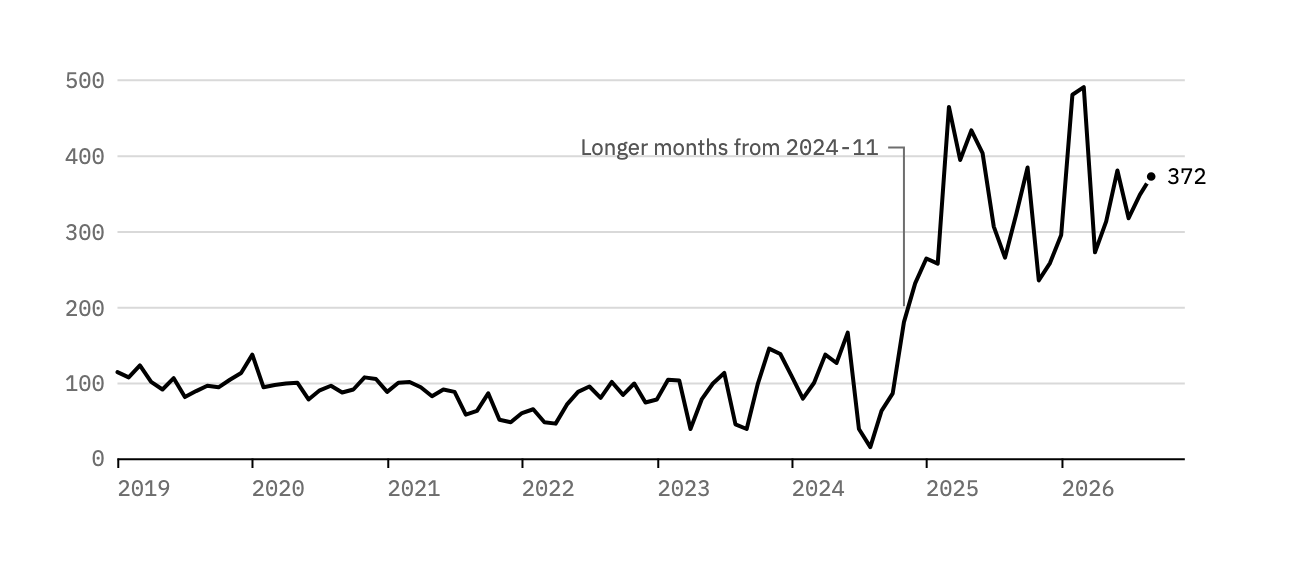
Line chart of the words in each Log month from 2019-01 to 2026-09: about 100 a month until 2024, then from 2024-11 between 230 and 490, ending at 372 100 200 300 400 500 0 2019 2020 2021 2022 2023 2024 2025 2026 Longer months from 2024-11 372
Line chart of the words in each Log month from 2019-01 to 2026-09: about 100 a month until 2024, then from 2024-11 between 230 and 490, ending at 372 100 200 300 400 500 0 2019 2022 2025 Longer from 2024-11 372
Words in each Log month. One line, labeled at its end and at the one change worth naming.

Two Series

Side by side in rows

  1. Log2025: 122026: 9
  2. Research2025: 02026: 28
  3. Notes2025: 52026: 10
  4. Darkroom2025: 82026: 0
  5. Project Humane2025: 02026: 7
  6. Flâneur2025: 52026: 4
  7. Obsidian2025: 22026: 4
  • 2025
  • 2026
Pages published in each section in 2025 and in 2026 so far. Built in HTML like the single bar list, so it reflows on a phone.

Side by side in columns

Grouped columns for 2021 to 2026, Flâneur dispatches in gray beside notes in ink: dispatches 3, 2, 1, 2, 5, 4; notes 0, 0, 0, 1, 5, 10 3 2021 2 2022 1 2023 2 1 2024 5 5 2025 4 10 2026 Flâneur dispatches Notes
Notes and Flâneur dispatches published each year. With a dozen small counts the values sit on the columns and the gridlines go.

On one scale over time

Two step lines counting up from 2021 to 2026: Flâneur dispatches rise steadily from 0 to 17; notes stay at 1 or 2 until 2025, then climb to 17 by 2026-10 5 10 15 20 0 2021 2022 2023 2024 2025 2026 Flâneur dispatches Notes 17
Notes and dispatches counted up since 2021 (one note predates it). Both reach 17 in 2026-10: the dispatches over six years, most of the notes since 2025. The comparison is an optional layer.

Before and after

One row per section from its 2025 count to its 2026 count: Research 0 to 28, Project Humane 0 to 7, Notes 5 to 10, Obsidian 2 to 4, Flâneur 5 to 4, Log 12 to 9, Darkroom 8 to 0 2025 2026 0 10 20 30 Research 0 28 Project Humane 0 7 Notes 5 10 Obsidian 2 4 Flâneur 5 4 Log 12 9 Darkroom 8 0
The same numbers as the paired rows, drawn for the change: each row runs from 2025 to 2026, rises first and falls last, with the values in columns at the right.

Part to Whole

Counted one by one

  • Measured 2
  • Confirmed 34
  • Product specification 16
  • CAD drawing 11
  • Derived 3
  • Estimated 113
Every recorded fact in the studio specification, from the Ambient Computing entry on what to measure next: 63 known, 116 still to check.

Year by year

One bar per year from 2019 to 2026, each split into long, medium, and short Log months. Through 2024 every month is medium or short; 2025 has 11 long months and 1 medium; 2026 has 9 long months so far 2019 7 5 2020 4 8 2021 2 10 2022 1 11 2023 5 7 2024 7 5 2025 11 1 2026 9 Long, 250 words or more Medium, 100–249 Short, under 100
Log months by length. Through 2024 none reached 250 words; since 2025 almost all have. Bars keep their true length, so 2026 stops at nine months.

Difference

Above and below a baseline

Columns for each Log month from 2019 to 2026, measured from the 2019–2024 median of 94 words: small rises and falls until 2024, then from 2024-11 every month above, by 140 to nearly 400 words +400 +300 +200 +100 −100 0 2019 2020 2021 2022 2023 2024 2025 2026
Each Log month against the 2019–2024 median of 94 words: above it in ink, below it in tone 3.

Distribution

How one measure spreads

Histogram of the words in each Log month in steps of 25: the 2019–2024 months pile up between 50 and 150 words, the 2025–2026 months spread between 225 and 500 10 20 30 0 100 200 300 400 500 2019–2024 2025–2026 Months Words in the month
Words in each Log month, counted in steps of 25: two humps, one for each way of writing the Log.

Relationship

Two measures of the same thing

Scatter plot of every Log month by bullets and words. The 2019–2024 months cluster in gray near 10 words a bullet; the 2025–2026 months in ink sit higher, near 30 words a bullet Words in the month 100 200 300 400 500 0 5 10 15 Bullets in the month 10 words a bullet 30 words a bullet 2025–2026 2019–2024
Every Log month by its bullets and its words. Since 2025 the bullets themselves run longer, from about 10 words each to about 30.

Calendar

Year by month

Show
Calendar of Log months, years 2019 to 2026 down and months 01 to 12 across, each cell shaded by its words in four steps; the 2025 and 2026 rows are the darkest. The last three months of 2026 are open 01 02 03 04 05 06 07 08 09 10 11 12 2019 2020 2021 2022 2023 2024 2025 2026 Under 100 words100–199200–299300 or moreNot yet written Under 6 bullets6–89–1112 or moreNot yet written
Every Log month in four steps. The control switches the measure; the steps of each are in the key.

Small Multiples

One small chart per year

Eight small line charts, one per year from 2019 to 2026, each showing that year's words per Log month on the same scale: flat near 100 through 2024, then near 300 to 490 in 2025 and 2026. Totals run from 911 words in 2022 to 3,986 in 2025 2019 1,219 words 250 2020 1,181 words 2021 950 words 2022 911 words 2023 1,080 words 250 2024 1,331 words 2025 3,986 words 2026 3,267 words
Eight small line charts, one per year from 2019 to 2026, each showing that year's words per Log month on the same scale: flat near 100 through 2024, then near 300 to 490 in 2025 and 2026. Totals run from 911 words in 2022 to 3,986 in 2025 2019 1,219 words 250 2020 1,181 words 2021 950 words 250 2022 911 words 2023 1,080 words 250 2024 1,331 words 2025 3,986 words 250 2026 3,267 words
Words in each Log month, one panel per year, every panel on the same 0–500 scale so their heights compare. Four across, two on a phone.

In Tables and Text

Bars in a table

Pages in each section, the right-aligned column drawing its own bars:

Section Since Pages
Log 2019 93
Research 2026 28
Notes 2018 17
Flâneur 2021 17
Darkroom 2024 12

A sparkline in a sentence

The Log has run for 93 months, and its months have grown from about 100 words to more than 300.

Darkroom

The zones

Eleven gray patches from black to white, zones 0 to X, with black, dark detail, middle gray, light detail, and paper white named under zones 0, III, V, VII, and X 0 Black I II III Dark detail IV V Middle gray VI VII Light detail VIII IX X Paper white
The Zone System’s eleven zones as tones of a print. They’re the paper’s tones, not the page’s, so they stay put in dark mode.

A characteristic curve

A schematic characteristic curve: density rises from base plus fog through the toe, along the straight line, and flattens at the shoulder as exposure grows a stop at a time Density Base plus fog Exposure, one stop a tick Toe Straight line Shoulder
A film’s characteristic curve in outline, density against exposure. Schematic: no film was measured for it.

Instruments

The two series over time above carry a toggle and the calendar a segmented control; both work by CSS alone. A scrubber moves through marks:

Column chart of research entries per day from 2026-10-01 to 2026-10-19: three to seven a day through 2026-10-06, none for twelve days, then three on 2026-10-19 Ambient Computing Tools for Thought 7 2026-10-01 05 10 15 19
Column chart of research entries per day from 2026-10-01 to 2026-10-19: three to seven a day through 2026-10-06, none for twelve days, then three on 2026-10-19 Ambient Computing Tools for Thought 7 2026-10-01 10 19

2026-10-19 · 3 entries in Ambient Computing

Research entries per day, from the journal’s first day to its latest entry. Drag the scrubber, or move across the chart, and the readout names the day.

Pictures

An illustration made for one page, a shelf in elevation or a drawer from above, stays an image. Drawn on white in the palette and in Plex, it stands on a white plate in both themes, framed like any picture.

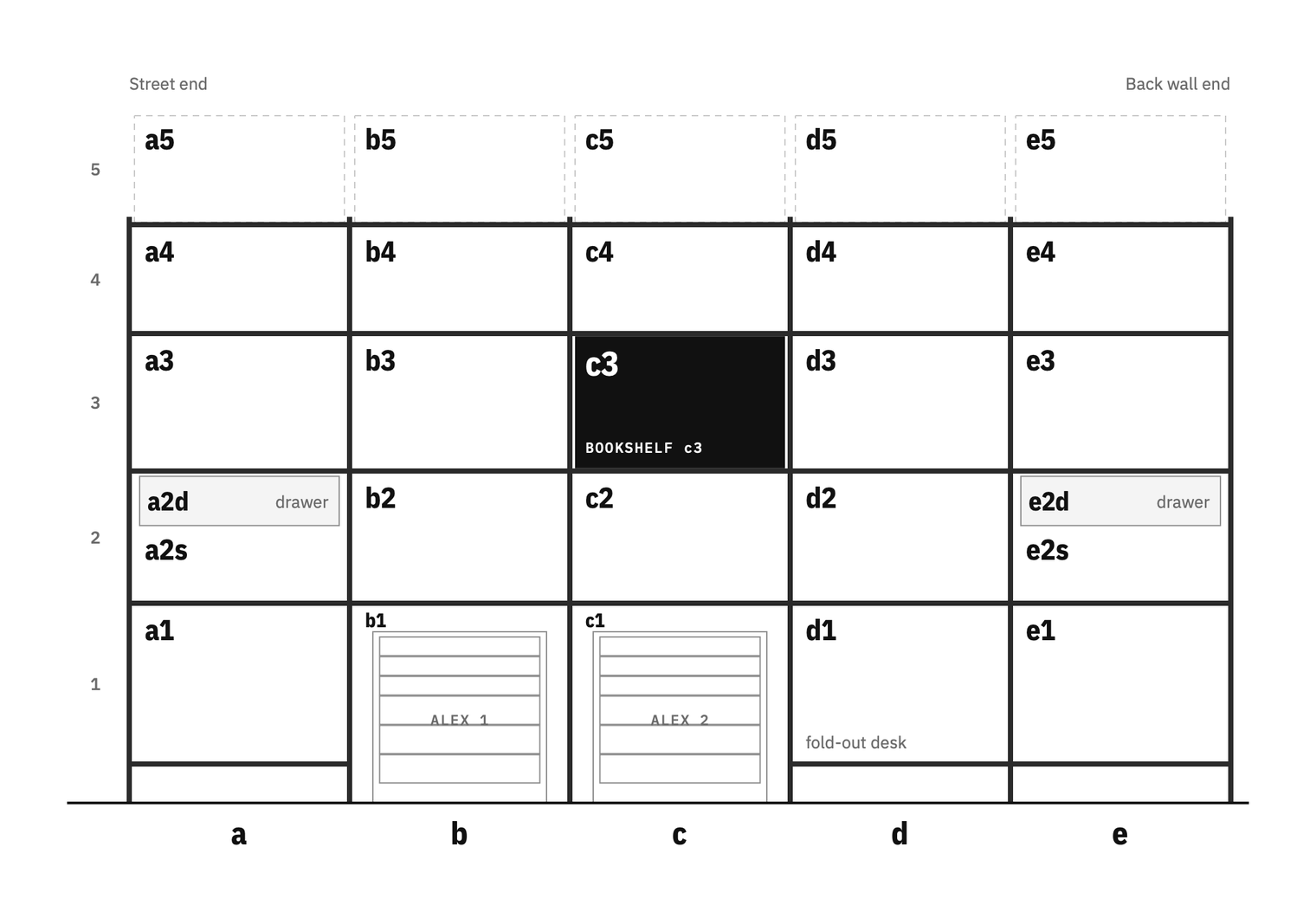
Elevation drawing of the Bookshelf, a tall IVAR on the Lab's left wall, as a grid of columns a to e and rows 1 to 5 with every cell named; c3 is filled in black, a2 and e2 each hold a drawer above an open shelf, and the Alex carts park in b1 and c1

The Bookshelf from the Ambient Computing stream, a PNG drawn on white.

Annotated

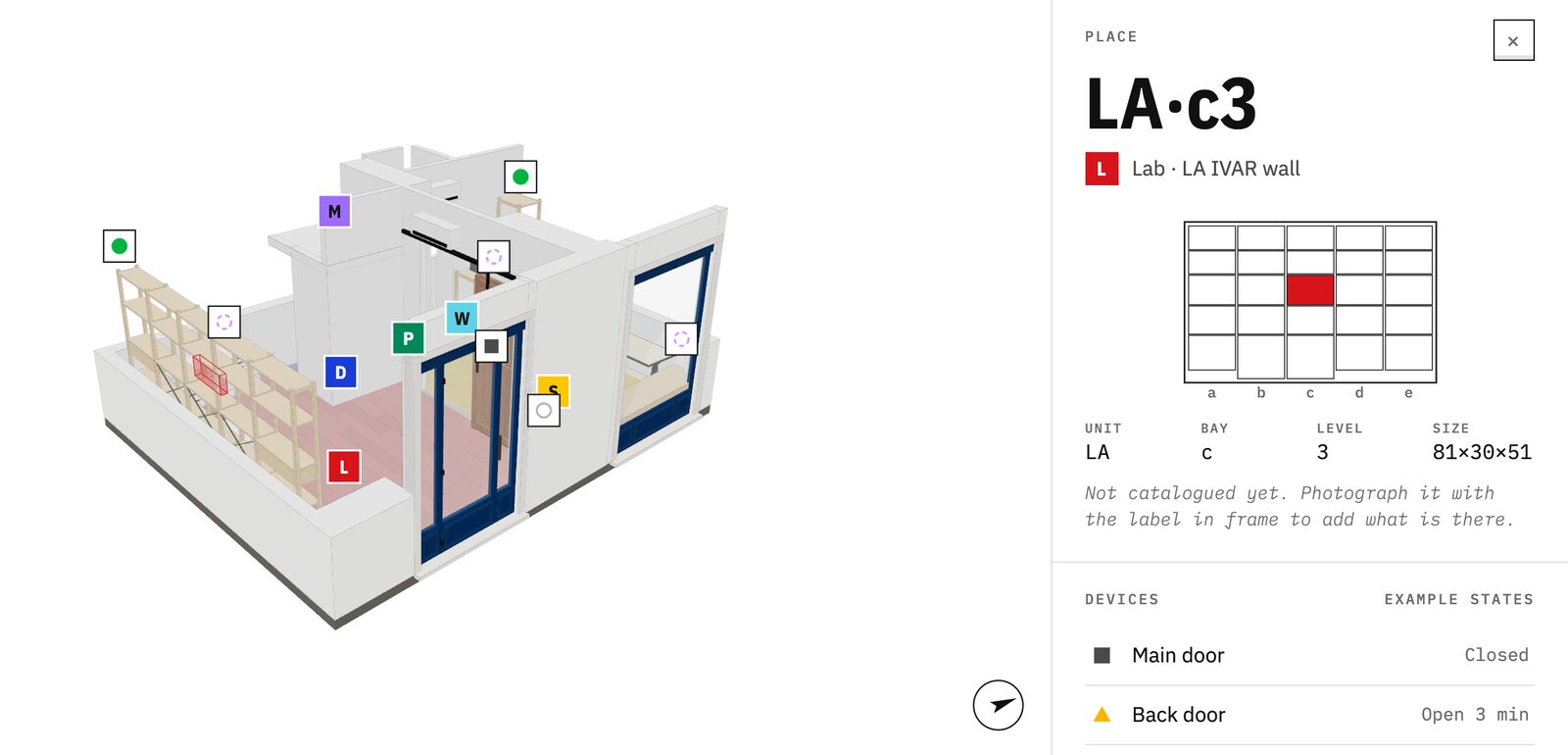
The studio model with shelf LA·c3 highlighted on the Lab IVAR wall, beside a card showing the address and a diagram of the unit
  1. The place, highlighted in the model
  2. Its address
  3. The unit drawn, the place filled
  4. The room’s letter
  5. Devices nearby and their states
A place card from the studio viewer, from the Ambient Computing stream, its parts numbered beside them rather than on them.

Compared

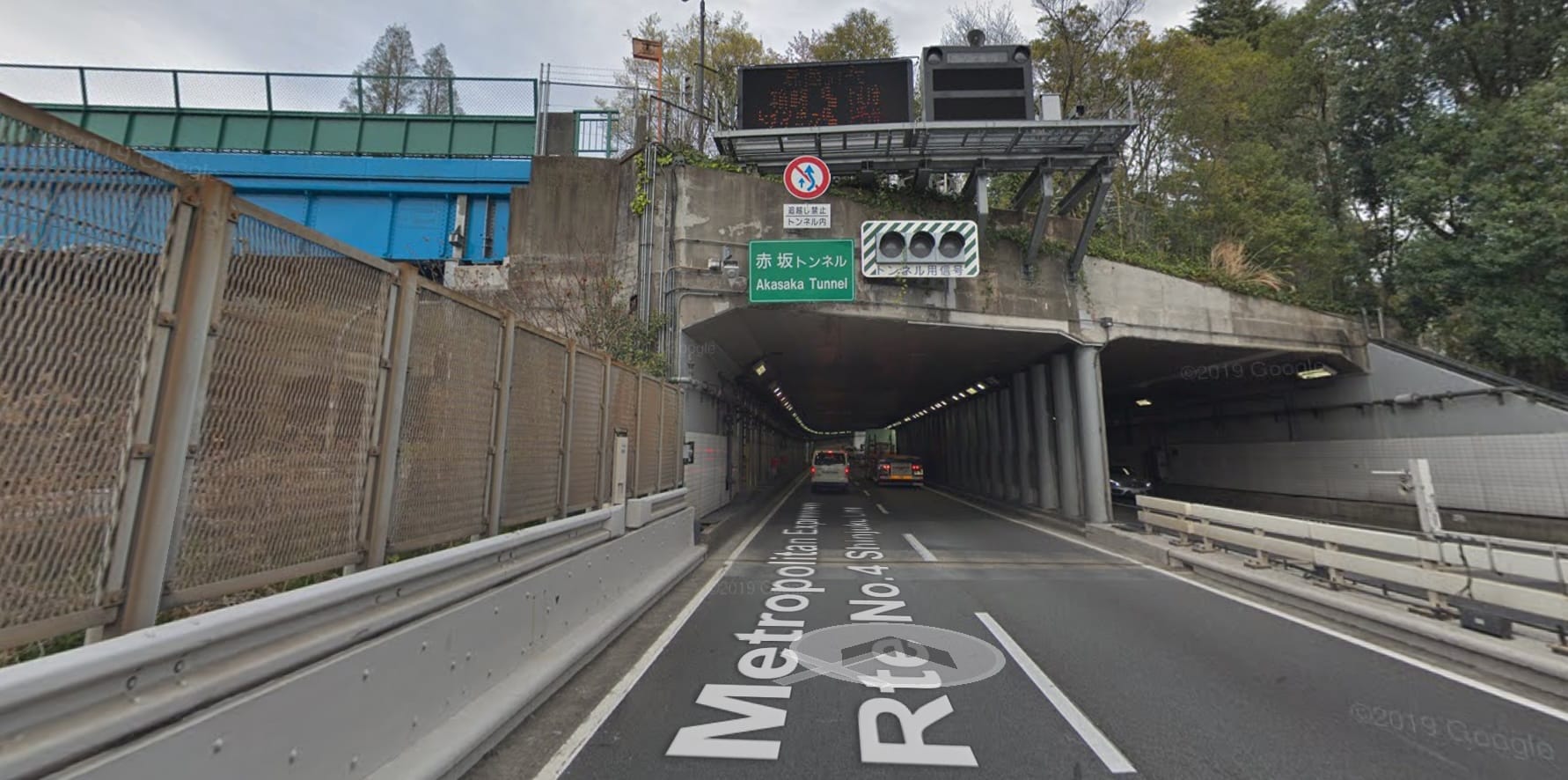
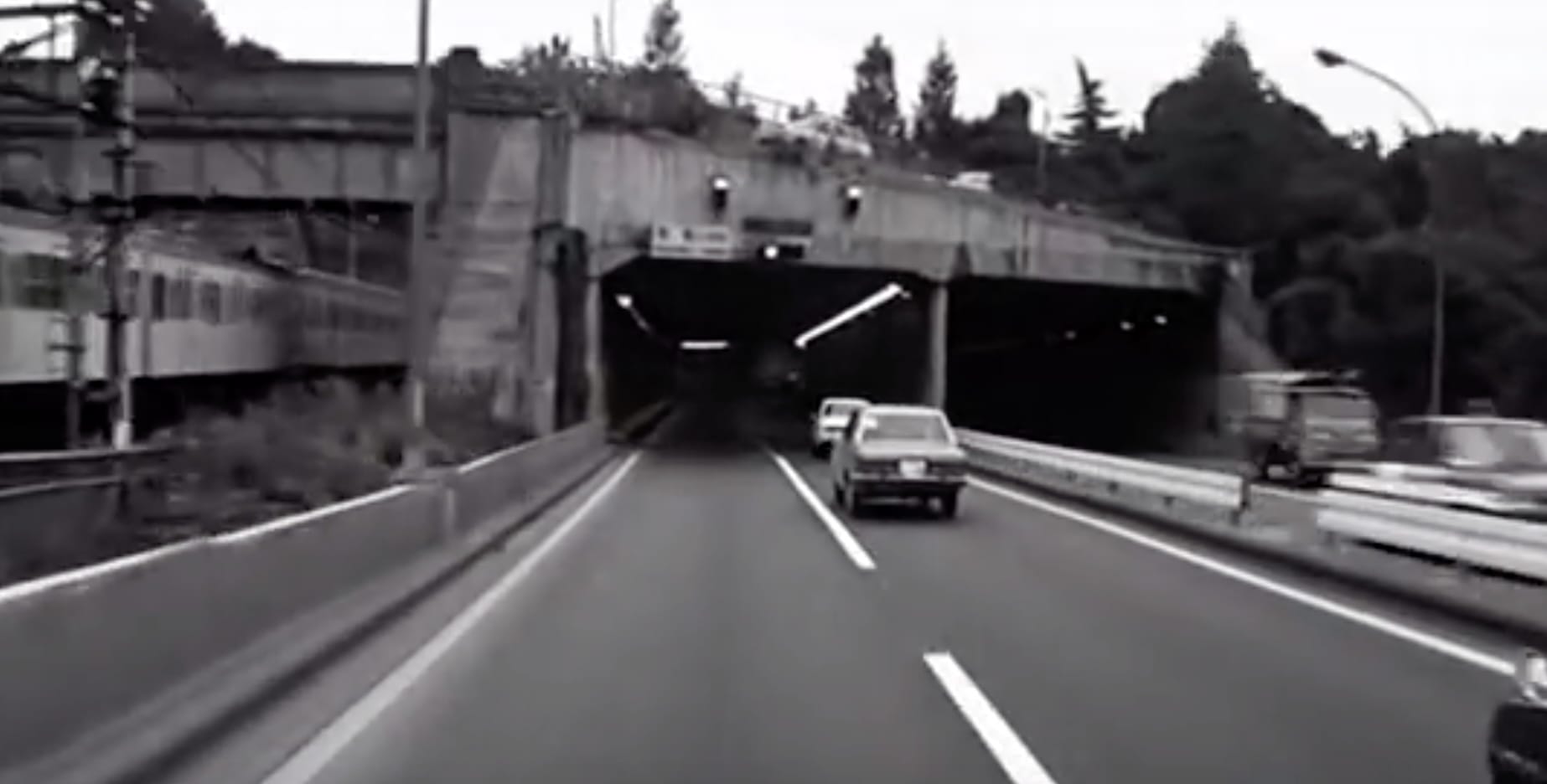
Drag across the frame, or use the arrow keys: the view from Minami-motomachi Park in Tarkovsky’s film and today. The Solaris highway article compares each of its eight places this way.

Step by step

Four numbered panels: a printed sheet with dashed fold lines, the sheet folded in half, folded again at right angles, and the folded signature with its spine marked 01 A printed sheet, its folds still dashed 02 Fold it in half across the long side 03 Fold again at right angles 04 Spine One signature: four leaves, eight pages
Folding a sheet into a signature. Photographs of a process would take the same strip.

Making Figures

Drawn by the build

1 2018 12 2019 12 2020 15 2021 14 2022 13 2023 20 2024 37 2025 68 2026 Log months Everything else
Pages published each year, the Log’s months apart, drawn by Hugo from the site’s own pages whenever it builds: it changes when the next page goes out.

From a spreadsheet

tools/chart.py turns a CSV like this into a chart in the palette, written beside it for the drawing shortcode:

uv run tools/chart.py columns static/visuals/figures/research-kinds.csv --width 360
research-kinds.csv
kind,entries
Progress,21
Question,5
Finding,2
Columns for the research journal's entries by kind: progress 21, question 5, finding 2 21 Progress 5 Question 2 Finding
What it draws: the research journal’s entries by kind. A line over dates is chart.py line.

In the email